
Friday, November 16, 2012
This is the end?
This exercise has not been particularly hard, just time consuming. I had a few ahha moments with some of the exercises, but for the most part being an older student, I have learned these skills long ago. This projects is great for younger students, or people that don't have an idea about what or where they need to look for things. For older students, maybe there should be prizes for the people who meet certain milestones. Free regular coffee would work for me. This type of exercise would be helpful for classroom use if there needed to be a set and measurable unit. The teacher can take some of the tools they find useful and incorporate them into the classroom. As far as I am concerned, I will keep all of the blogs I signed up for and plan to keep up with technology that way. Technology is moving so fast, I can hardly wait to see what the future brings.

Thing 23 - CC is ok with me.
The original 23 things
Here is the link to the original 23 things. The APSU 23 things is based loosely on this one, which is based loosely on the 43 things website. The creative commons license is a pretty interesting concept, and it can be used in the classroom to share music and videos as well as documents.
Here is the link to the original 23 things. The APSU 23 things is based loosely on this one, which is based loosely on the 43 things website. The creative commons license is a pretty interesting concept, and it can be used in the classroom to share music and videos as well as documents.
Thursday, November 15, 2012
Thing 22 In a binder!
I used this thing as a trial to see if I could create meaningful binders that I could possibly use. I created three binders and names them Special Education, Gifted and IEP's. Each on is a collection of TTP's (Tips, tricks and practices) that can be used either in the classroom for enrichment, or to help young teachers and parents know about IEP's. I actually kind of like these binders, they really only contain what you want in them, nothing more nothing less. With these binders, there are many applications that they could be used for in the classroom. WebQuests, making a specialty book for a particular subject or even just using it to collect ideas for art classes.
My Binders
My Binders
Thing 19 there's more than Facebook?
I knew that there were other social networks out there, no seriously. I started this Thing by going to Teacherpop. The sign up was easy, then you wait a day to get approved and finally you can do things on the website. I read most of the blogs and comments about the issues with posting the badge in this blog. I tried it a few times, then just moved on to one of the other activities.
I am a member of many social networks, everything from a popular radio show's message board to Goodreads and military community social networks. Each of the networks addresses a particular segment of my life. The one I have been on the longest is the radio show network. I first joined that group in 2000 when I came back to the United States from Germany. Many of us have never met in person, but send cards, post pictures and watch our children grow up together. It is my online family.
Of the social network links provided, I find that I usually gravitate to the cooking related ones. I always love to find good recipes for amazing food. Other networks that are not listed that I would be interested in would be for outdoor activities, assorted hobbies and of course teaching specific ones for my field.

I am a member of many social networks, everything from a popular radio show's message board to Goodreads and military community social networks. Each of the networks addresses a particular segment of my life. The one I have been on the longest is the radio show network. I first joined that group in 2000 when I came back to the United States from Germany. Many of us have never met in person, but send cards, post pictures and watch our children grow up together. It is my online family.
Of the social network links provided, I find that I usually gravitate to the cooking related ones. I always love to find good recipes for amazing food. Other networks that are not listed that I would be interested in would be for outdoor activities, assorted hobbies and of course teaching specific ones for my field.
Wednesday, November 14, 2012
Cruising Iraq - Thing 21
Cruising Iraq
Animoto is a very easy to use program to make 30 second clips. It was incredibly easy and the program allowed you to upload your own pictures, or use theirs as well as adding music to the presentation. It will automatically adjust how fast the pictures go, by the number of pictures you upload. While all of this is really cool, the down fall is paying for a service that comes standard on Windows 7 and Macs. This one might be a little easier, but it also costs more than the programs that come standard. Bottom line, its fun, but if you need to make longer video presentations, look elsewhere.
Animoto is a very easy to use program to make 30 second clips. It was incredibly easy and the program allowed you to upload your own pictures, or use theirs as well as adding music to the presentation. It will automatically adjust how fast the pictures go, by the number of pictures you upload. While all of this is really cool, the down fall is paying for a service that comes standard on Windows 7 and Macs. This one might be a little easier, but it also costs more than the programs that come standard. Bottom line, its fun, but if you need to make longer video presentations, look elsewhere.
Thing 20 can you Youtube?
Youtube is such a cool website. You can view everything from old television shows to the latest music video. This is the video equivalent to Facebook, and can be utilized to do classwork, spread propaganda or post a video about social justice. I did a search on Youtube about funny education videos, and this video was a winner. I have been discussing this topic with fellow prospective teachers and all of us wondered what we would be expected to know in the classroom that we didn't learn in college. This video puts kind of a funny spin on the entire subject. I really like this website, mainly because you can find pretty much everything you want to. What I really dislike about this website is the addictiveness of it. One video leads you to another, then another and then 3 hours has gone by. I find myself using it for different music groups, and I'll play song playlists as background music. Youtube has become the gold standard of all video sharing websites.
Tuesday, November 13, 2012
Thing #18 Social Networking or snooping on people?
Facebook is my friend, but not just any friend, it's my BFF. Not like that Tom fella at Myspace that dropped off the net when the going got rough. I was very hesitant to get a Facebook account at first, but the Army sent me to South Korea for an extended period of time, and I needed a way to talk to people. I used yahoo messenger to communicate with my family that was 14 hours behind in Kentucky. My friends and I chatted back and forth on Facebook, sending pictures of bygone days in some forsaken part of the world that we occupied together. I guess you could say that part of my Facebook is a virtual VFW for Military buddies. I am overly cautious about who I accept friend requests from, and my page and pictures are set to private. I never used to do this, but I found someone was copying pictures of my military career and using them as their own. A sad but true fact of the digital world.
Knowing all about networking is a way to digitally monitor what is going on around you and your class. There have been numerous news stories about teachers, administrators and parents intercepting messages pertaining to cyber bullying or cheating or in some cases inappropriate behavior. This knowledge can also keep you out of trouble. The rule I tend to stick with is not to friend any students, nothing personal, just keeping myself above reproach.
Facebook has many practical applications for classroom use. I have several class pages that I follow, and the teacher uses the page to post homework, start discussions and most importantly keep the parents informed. Like any tool, if you use social networking correctly, it will work well for you. On the other hand misuse could cause injury. Something to think about.

Knowing all about networking is a way to digitally monitor what is going on around you and your class. There have been numerous news stories about teachers, administrators and parents intercepting messages pertaining to cyber bullying or cheating or in some cases inappropriate behavior. This knowledge can also keep you out of trouble. The rule I tend to stick with is not to friend any students, nothing personal, just keeping myself above reproach.
Facebook has many practical applications for classroom use. I have several class pages that I follow, and the teacher uses the page to post homework, start discussions and most importantly keep the parents informed. Like any tool, if you use social networking correctly, it will work well for you. On the other hand misuse could cause injury. Something to think about.
Monday, November 12, 2012
The Delicious Thing #17
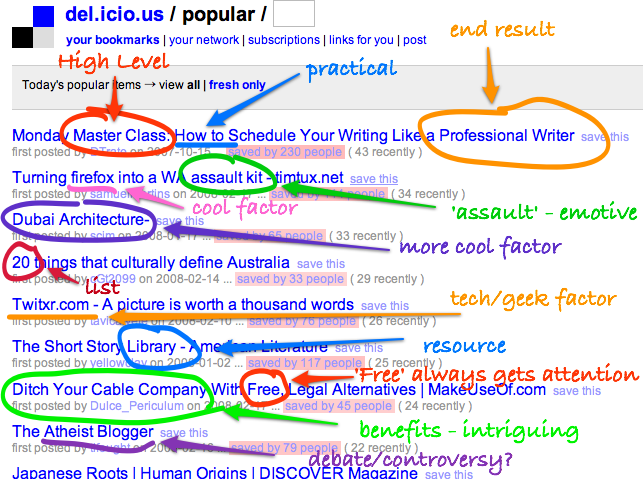
Delicious is an interesting website. Diigo is similar, but not as broad. I have seen the Delicious tags on different website, and really didn't understand what they were. Utilizing the educational technology phrase to search, about 47 million different links popped up. I saw many that I already knew about, but there were many from other countries that were pretty cool to look at. This is a gold mine for different subjects, and can be used in the classroom as a tool to start the creative process. The students would have to be supervised, because like much of the internet, there are inappropriate sites for the students to become involved in. If you set up a group and have screened links in it, your chances of success increase.

Thing 16 - Helpers for college people
I always enjoy finding new ways to help me become more productive, or keeping a handle on what is due when in what class. See, I'm a bit of a old fashioned person, I firmly believe in pads of paper with Honey-dos things to accomplish written on them. This is a good system, until a family member needs a pad of paper, and then my list is gone. The online or virtual to do list is a great alternative, and the kids can't carry it away. I modified my iGoogle start page, and added some widgets to it. Some of them will help with productivity, and others like the googly eyes are there for the sheer entertainment value. Google calendar is still my favorite to use, and I like the fact calendar alerts are sent to my cell phone. I looked at Tada list and Jott, both of which have ceased to exist, but found Remember the milk, which is running strong. It will marry up to several different applications, or can be used as an app, with both PCs and Macs. I added the app to my Google calendar so I can make very specific to do lists and even prioritize them. The one downfall to this entire process is inputting the information. One of the reasons to get and use these tools is to help streamline your tasks, calendar, or honey do's, but if you never remember to put the information in, the programs are worthless to you. There are many great and helpful programs in the thing 16 instructions, but you have to figure out which ones will work for you.

Tuesday, October 30, 2012
Thing 15 Wiki Wiki Wiki What?
The great Wiki debate. A free flowing information website that can be changed by any number of people. This week I was given a very good reason to never use a wiki site. I was told by a professor that they like to go on Wikipedia and insert false information to see how long it took for someone to catch it. There is still false information that was put on over a year ago that has not been fixed. As a collaborative effort a wiki makes sense, but if it is for anything other than entertainment they are not to be trusted.
Monday, October 22, 2012
Thing 14 A mind flow map chart?
This thing was not my cup of tea. I am not a flowchart or mind map kind of guy, I see myself as more of a free flowing, less structured individual. I tried the Gliffy flowchart maker, and the bubbl.us mind map maker. Both were easy to set up, and both you needed to make an account to save your work. Gliffy had a grid background so it was easy to set the different shapes in specific ways and keep everything aligned. The mind map maker was pretty much the same. It did not have the grid, but when you clicked on the starting bubble, it gives you other bubbles to fill in and move around. Both of these are good resources if you have to use them, but I would much rather sit down with a piece of paper and a pencil to draw things out. To each there own.

Friday, October 12, 2012
Think 13 Zoho vs Google Docs
After making my Zoho account, I decided to check out all of the features that were offered. I found that it is a little more business and distant collaboration friendly than what the Google suite currently offers. With that being said, I still am more apt to go with Google strictly because I don't need all the business apps or the work from home apps. I do see a great use for Zoho and understand how it can and will make business run more smoothly.
Google Docs is able to be accessed pretty much anywhere, and you can send documents or presentation to anyone with an email address. I am unsure if you can do the same with Zoho.
The entire debate comes down to personal preference, but like or dislike they both have their strong points.
Google doc Picture
Google Docs is able to be accessed pretty much anywhere, and you can send documents or presentation to anyone with an email address. I am unsure if you can do the same with Zoho.
The entire debate comes down to personal preference, but like or dislike they both have their strong points.
Google doc Picture
Wednesday, September 26, 2012
Thing 12 It's all about Google
Google, the search engine that became a power house in the industry and a verb. This was probably the easiest of the things for me, mainly because I love Google. There are so many things that you can do, both personally and professionally, it is amazing. I currently use most of the Google services with my position in the Student Veterans Organization. I keep calendars current, put documents that the group needs in the document area and use iGoogle regularly, well at least until it goes away in November. I have made the transition to Google + and will continue to use the Google products until they become obsolete.
In order to keep on top of the SVO calendar, I update it regularly and have set up alerts for my computer, email and phone. Nothing is worse than missing a key appointment or event. The phone connection is kind of a new thing for me, but since I always have my phone with me, it made sense to connect the two. I tend to shy away from the instant online translators just because I don't have a lot of faith in them. I wrote a document using one of them, and then had a native speaker read the letter. Needless to say, I would have embarrassed myself had I sent it. If there is a word I need to translate, that's find but nothing else.
Google is like the Swiss Army knife of websites, what it does, it does very well, but it wasn't there, you probably didn't need it.
In order to keep on top of the SVO calendar, I update it regularly and have set up alerts for my computer, email and phone. Nothing is worse than missing a key appointment or event. The phone connection is kind of a new thing for me, but since I always have my phone with me, it made sense to connect the two. I tend to shy away from the instant online translators just because I don't have a lot of faith in them. I wrote a document using one of them, and then had a native speaker read the letter. Needless to say, I would have embarrassed myself had I sent it. If there is a word I need to translate, that's find but nothing else.
Google is like the Swiss Army knife of websites, what it does, it does very well, but it wasn't there, you probably didn't need it.
Tuesday, September 25, 2012
Thing 11 Searchinig for good feeds.

Monday, September 17, 2012
Thing 10 - The infamous RSS feeds
The magical RSS feeds. I always wondered exactly what they were, but I never had the need to actively find out anything about it, that is until now. My first impression of this feed system was not a positive one, I just figured lots of junk would be sent to my Google reader. Since the class required active participation, I persisted and found out that there is a lot of pretty cool feeds. I changed the way I look at the RSS feeds. Instead of being just another pain in the neck school project to do, I now look at it like a gill net that catches a wide variety of information. I found that the more specific I tried to get the feeds, the better quality that I would get. I picked a variety of feeds to follow, selecting both personal hobbies and future profession feeds. Signing up to follow them was a breeze, now I just need to make sure to check them daily.
Using this new tool in both my personal and professional life is going to make data collection much easier. New teachers will be able to gather mass quantities of subject specific information with the current tips, tricks and trends that are being used around the world. Using these feeds is like having a direct line to the different teachers, and classrooms to share and collaborate with one another.
This is a piece of information technology that I plan to start using more in the future.
Using this new tool in both my personal and professional life is going to make data collection much easier. New teachers will be able to gather mass quantities of subject specific information with the current tips, tricks and trends that are being used around the world. Using these feeds is like having a direct line to the different teachers, and classrooms to share and collaborate with one another.
This is a piece of information technology that I plan to start using more in the future.
Friday, September 14, 2012
Thing 9 Funny Stuff


The comic strip generator that I used was Txt2pic. There were so many funny cartoons that can be modified, it was a hard choice. These funny tongue in cheek kind of humorous things really makes me smile. I love seeing things like this come across my facebook feed. I think the reason I like these so much is the situation depicted in the cartoon along with the kernel of truth that is in the words. These type of cartoons can be used either in newsletters or on a web page for the class. You can also use these website with the students and have them create their own funny cartoon. Below is one of my newest favorites. It's funny because the military student or veteran is usually one of the older students and most of us feel like we're in school with a bunch of little kids.

Wednesday, September 12, 2012
Thing 8 third party tools
Make yours @ BigHugeLabs.com
After browsing the enormous amount of mashup and third party tools, I chose to use Map Maker. This tool allows you to mark every country that you have ever visited, and the program highlights that country on a map. The colors are completely adjustable as is the map. You can change the map from a world view down to a specific region. While the map itself is a neat little tool, it serves more as a conversation piece than anything else.
Flickr and some of the other tools can be used to create bellringers or make displays for the different areas of the classroom. There are so many different tools that you can use, you really have to know what you're looking for. In personal life, I have used Flickr to share photos with distant friends and relatives. I have no issues with sharing photos online, however, I am very particular about which ones get put on the web. Any picture that could be viewed as questionable or having some kind of "issue", I will not post. In the classroom, websites like Flickr can be used to show parents what their children are doing. Care must be taken when posting pictures of children, so make sure you are 100% right and legal before doing anything.
Thing 7 - Become a Flickr fan

http://www.flickr.com/photos/darrenbarnes/4781929894/
This phenomenal photo was taken by Dwood Photography. I spent a few weeks in Alaska this past summer and really wanted to see if people on Flickr had photo's similar to mine. The reason I chose this particular picture was simple it is stunning. While in Alaska the bald eagle, a symbol of our great country and freedom, were every where. The tour guide told us that 90% of America's bald eagle population live in Alaska. I found them so captivating that I would take pictures every chance I could. This picture fondly reminds me of my trip, and all the fun that I had.
Monday, September 10, 2012
Think 5 - the 2.0 movement
So I am reading all of the 2.0 links, and I find myself reading the same basic story being told by different people and websites. The 2.0 movement/phenomenon/whatever at its most basic definition is utilizing computers and social media to connect people and ideas around the world. The social media websites are growing at an amazing rate, and some of the larger ones seem to spin off others. Just look at the rate of growth for Facebook. Myspace was the king of social media and it just seemed one day people lost interest in it and moved to the next great thing. This is something we as teachers need to grasp a hold of, we are moving into a more technology based teaching style. I'm sure the teachers of years back had heartburn when classes moved from chalkboards to whiteboards, and this is just something some of us old students have to become comfortable with. School 2.0 is going to be an ever evolving process of improving technology in the classroom and in the individual lessons. I personally have a hard time with some of the technology, but I am learning and coming into the 21st century.
Think 6 - Carbonite the wave of the future
I chose the web site carbonite (http://www.carbonite.com/en/) from the list of award winners. This website is very personal to me, since I've been a subscriber for about three years. This website will give you a free month trial for online back up to see how you like it. If you don't want it, no pressure just uninstall the program and go on about your merry way. If you do like it, you can pay a modest fee of $59 a year for unlimited back up of your computer. For a little more you can get a few more features, but for the $149 package, it will back up everything on your computer and external hard drive and even make a mirror image of your drives in case you need to restore everything. I originally got carbonite because I didn't want to lose all of my family pictures and documents from over the years. So I downloaded the program, installed it, and except for the lock in your toolbar, you wouldn't know it was even doing anything. The program uploads the files and programs the user selects, to a secure server all while running quietly in the background. The initial upload takes a little while, but you wont see any significant processing lags because of it. Now for the question that I know everyone is wondering - have I had to restore files back to my computer? Quite simply, yes. About six months into using this program, my daughters thought it would be funny to play with my laptop. So as they opened and shut the laptop, the game got more fun until it got shut with a little bit too much effort. As a side piece of information, while your computer is running, the very fragile hard drive disk is spinning. Slamming the lid shut while powered on will literally shatter the hard drive internal components. I never really knew this until one of my daughters told me the laptop wasn't working. A trip to the computer repair shop and a new hard drive later, I reinstalled the carbonite software and retrieved all of the stored data. Everyone was happy, except for my daughters who paid $120 each for their part in wrecking the hard drive. I would recommend this product to anyone with children or anyone concerned about losing valuable pictures or data. I don't really see an application for this program for the library computers, simply because the majority of the data is saved to a thumb drive. The rest of the program data is all the same. Their commercials catch phrase is "it's not a matter of if you'll lose your data, but when". This is a great program and I am actually surprised they didn't win more awards earlier.
To Comment or not to comment Thing 4
In this great big online world that we are all part of, commenting is seen as a communication tool. It opens the door to a back and forth interaction between several individuals. Like everything else in life, there seems to be some unwritten rule for commenting. To not comment on something a friend posts is considered rude, and SO IS RESPONDING IN ALL CAPS. Commenting is, at its simplest terms, providing feed back to the original poster. Just think of how boring Facebook would be if nobody commented. Pretty grim. I comments on my required 5 students pages, and maybe it is because of my slightly advanced age, or maybe it's my good nature, but i found myself commenting positive and uplifting responses to individuals. I think life does a good job of kicking the crap out of all of us, so kind words and positive affirmation goes a long way.
I found so many different blogs that I am really interested in, but I managed to pick only three to follow.Two are for professional development and knowledge in my given field of Special education, and one is a fun one about Legos. The first SPED one is Special Education Strategies and more (http://michellespecialeducation.blogspot.com/). This is a great blog from a 16 year SPED teacher in Florida. She gives great advice on different classroom management techniques, games to play and activities to do in the class. This is a blog that I can learn enormous amounts of information from. The second professional one is Accessible Technology Tips (http://attips.posterous.com/). The person that runs the blog is a accessible technology guru. She has numerous websites for teachers, professional type people and parents. this is another great resource to learn from. My fun blog is a Lego one (http://legoisfun.blogspot.com) is my guilty pleasure. I learn new things from the blog and then go home and build them with my young son. The blogs I commented on, I thanked them for sharing the information and projects that could help me to be a better teacher.
Now that I have my eyes opened about the shear number of blogs that are available, I will take any opportunity I have to seek out blogs that can help me in my profession, and who knows maybe in a few years I'll have my own blog helping new SPED teachers. Crazier things have happened.
I found so many different blogs that I am really interested in, but I managed to pick only three to follow.Two are for professional development and knowledge in my given field of Special education, and one is a fun one about Legos. The first SPED one is Special Education Strategies and more (http://michellespecialeducation.blogspot.com/). This is a great blog from a 16 year SPED teacher in Florida. She gives great advice on different classroom management techniques, games to play and activities to do in the class. This is a blog that I can learn enormous amounts of information from. The second professional one is Accessible Technology Tips (http://attips.posterous.com/). The person that runs the blog is a accessible technology guru. She has numerous websites for teachers, professional type people and parents. this is another great resource to learn from. My fun blog is a Lego one (http://legoisfun.blogspot.com) is my guilty pleasure. I learn new things from the blog and then go home and build them with my young son. The blogs I commented on, I thanked them for sharing the information and projects that could help me to be a better teacher.
Now that I have my eyes opened about the shear number of blogs that are available, I will take any opportunity I have to seek out blogs that can help me in my profession, and who knows maybe in a few years I'll have my own blog helping new SPED teachers. Crazier things have happened.
Friday, August 31, 2012
Thing 1
Commit yourself to lifelong learning.
The most valuable asset you’ll ever have is your mind and what you put into it.
Brian Tracy
Brian Tracy
The 7 and 1/2 habits is a really interesting slide presentation. Because of my background, some of the habit come really easy, one I find extremely difficult is Habit 1. To begin with the end in mind is the most difficult for me. I don't find myself making long term plans, and then using backward planning to set milestones to ensure the learning journey goes smooth. I am more of a here's the goal, now go for it type of guy. This process leads me right into one of my greatest strengths, Habit 2 - accept responsibility for your own learning. I get tired of hearing the younger members of the class saying nothing is their fault, everything from not turning in homework to not taking classes or showing up to classes. Personal responsibility was drilled into me from day one of Basic training and it will be with me until I draw my last breath. One of the other habits on the presentation that I find to be an equal strength as my first habit is Habit 3 - View problems as a challenge. Some look at problems as insurmountable obstacles. I choose to look at them as a challenge, taunting me to try and best them. These are crucial habits that I have found very worthwhile for life as well as learning.
Thursday, August 30, 2012
Thing 3
Knowledge is power. Blogs are just words on a computer screen. Meaningless and worthless unless they convey some knowledge or entertainment. Blogs can be used by students in the education field for the exchange of knowledge both with instructors and classmates. These blogs can also be used as a mentoring tool for lower level students and even young teachers by mentors. One tidbit I learned in class was blogs can be used in conjunction with a resume in order to give a complete picture of the person. Once a teacher is hired, blogs can be used to give classroom information and share pictures of students with parents, and administration. These blogs can be used as a proof of professional development and as an example of what the teacher is capable of. Future teachers, new teachers and fellow teachers can use the blog to get information and ideas from one another, as well as sharing their own ideas with others. I think I am beginning to understand the popularity of these blogs.
Thing 2
This was my first attempt at creating a blog. I never did it because who wants to listen to the rants of an old man? When choosing the name of the blog, I used my nickname and added the blogging. I tried to name my blog Captain's blog, but it was already taken. I really think that this website made the whole setting up a blog very easy. The hardest part was making the avatar and using the different sites to create the blog. My avatar is a mixture of who I am. The chef hat or toque, represents my love of cooking and my families involvement in the food service business. The camouflage shirt represents the military tradition in my family, and honors those who have given the ultimate sacrifice. I made the avatar as close to my likeness as possible, but there wasn't any Fu Manchu mustaches. I decided to make my avatar as close to my likeness because people should know who they are talking to. The internet is a very anonymous place where people misrepresent themselves everyday, but I am saying here I am, and I'm really me.
Subscribe to:
Posts (Atom)